 DayTone
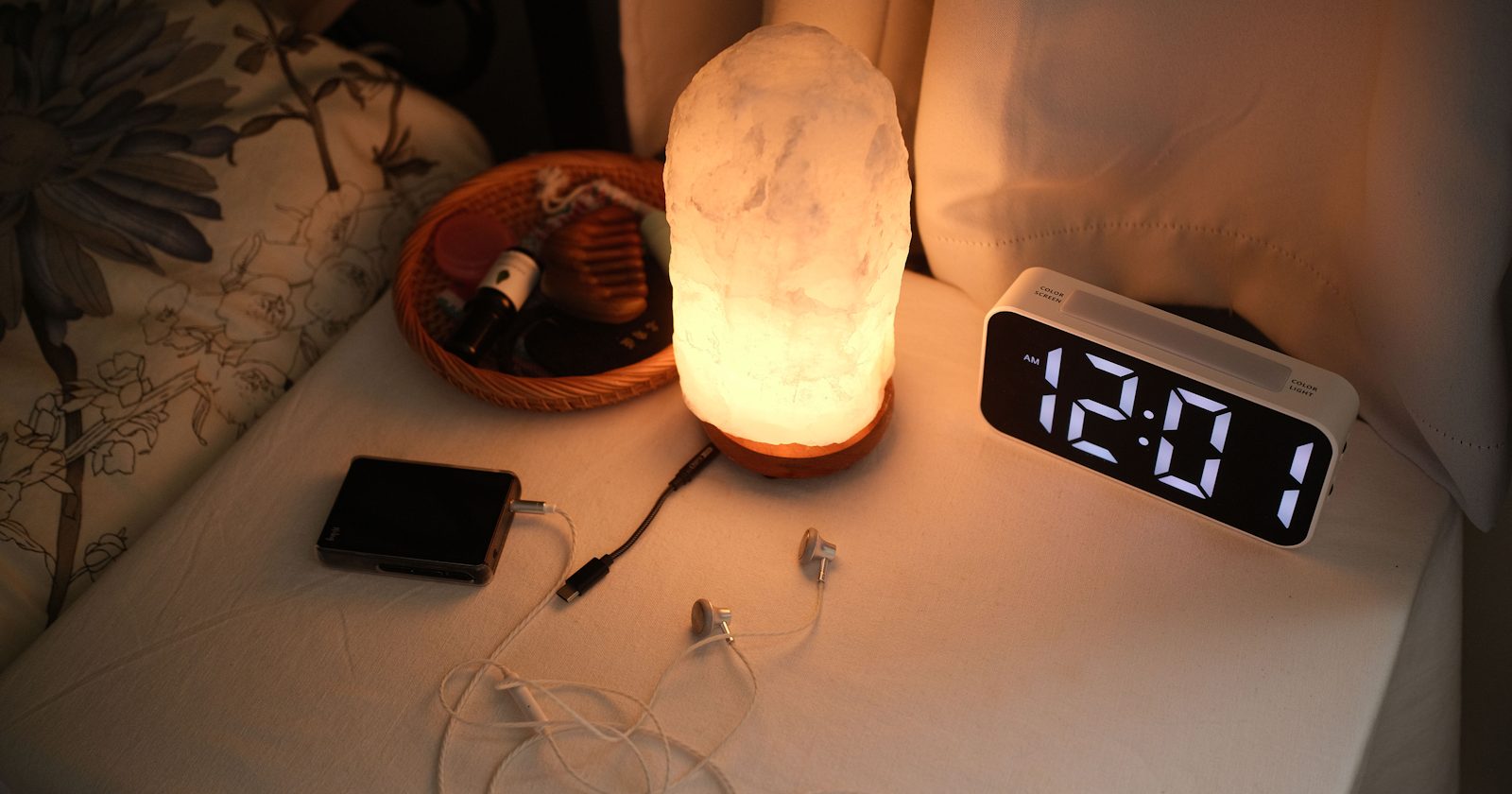
If your iPhone alarm didn't go off, start with the alarm itself: is it switched on, set for AM and not PM, and set for today? Then check that its sound isn't None, that the alarm volume is up, and whether it's the sleep schedule alarm, which has its own settings. If you wear an Apple Watch to bed, that alarm may have rung on your wrist instead.
Silent mode, Do Not Disturb and other Focus modes are not on the list. Apple says a Clock alarm still sounds with any of them on (Set an alarm in Clock). The rest of this guide goes through each check, the likely ones first. The odd causes (a feature that quiets alerts when you look at the phone, connected headphones, the the way StandBy works) come after.
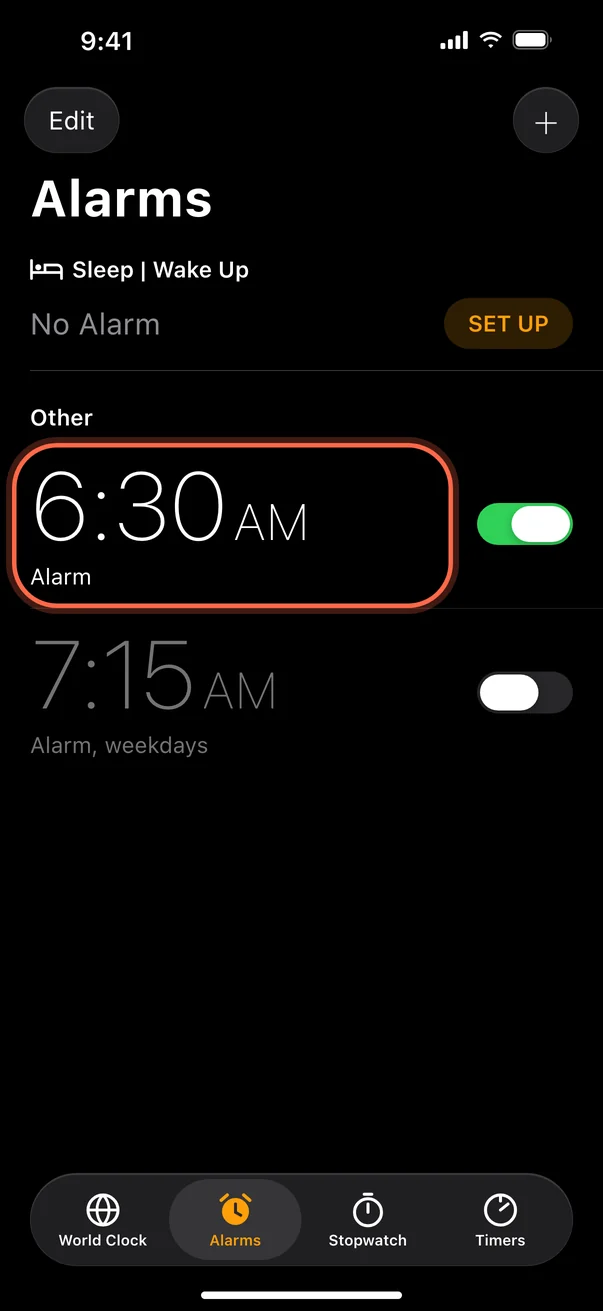
Check the alarm itself
Start in the Clock app.
- Open Clock and tap Alarms at the bottom.
- Check the toggle next to the alarm is on (green).
- Check the time. A 7:00 PM alarm looks a lot like a 7:00 AM one.
- Check the days. Under the time, the repeat days are listed. A one-time alarm turns itself off after it rings, and an alarm set to repeat on weekdays won't ring on Saturday.
- Check for duplicates. Two alarms for the same time, or a regular alarm next to the sleep schedule alarm, make it easy to switch off the wrong one.
If anything looks off, tap the alarm, fix it and tap Save.
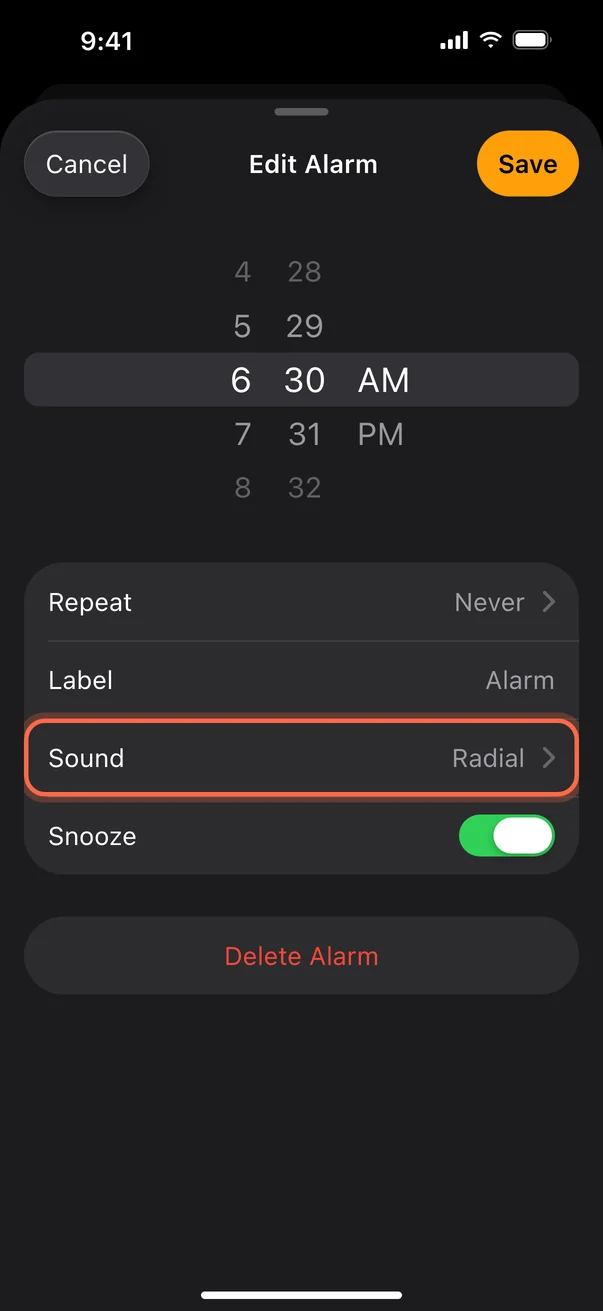
Check the sound isn't set to None
An alarm with no sound only vibrates, and a vibrating phone on a nightstand is easy to sleep through.
- In Alarms, tap the alarm.
- Tap Sound.
- Under Ringtones, pick a tone. Tap one to hear it.
- Go back and tap Save.
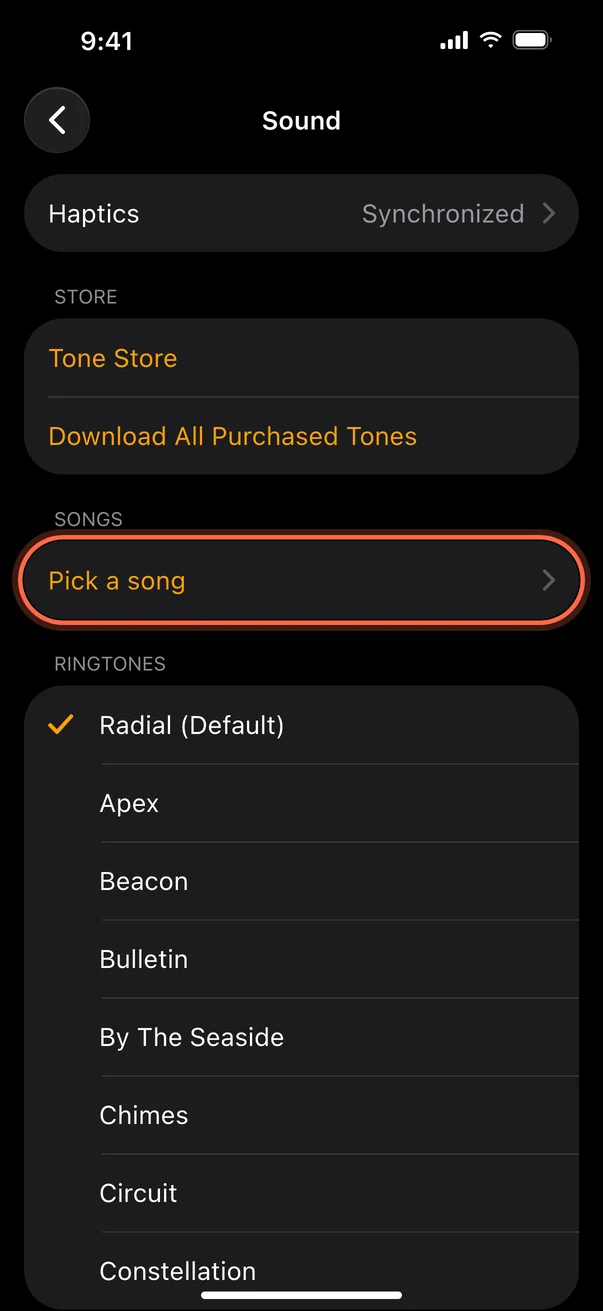
If you use a song from your Music library as the alarm sound and it doesn't play, download the song again or pick a built-in tone. More on that in how to change the alarm sound on iPhone.
Check the alarm volume
The alarm has its own volume. Turning a video up or down doesn't change it.
- Open Settings and tap Sounds & Haptics.
- On iOS 27, alarms can have a volume of their own. Under Alarms and Timers, turn off Match Ringtone Volume, then drag the slider that appears to the right. If you leave that switch on, the alarm follows the slider under Ringtone.
- On iOS 26 and earlier, drag the slider under Ringtone and Alerts to the right. Your alarm plays at that volume.
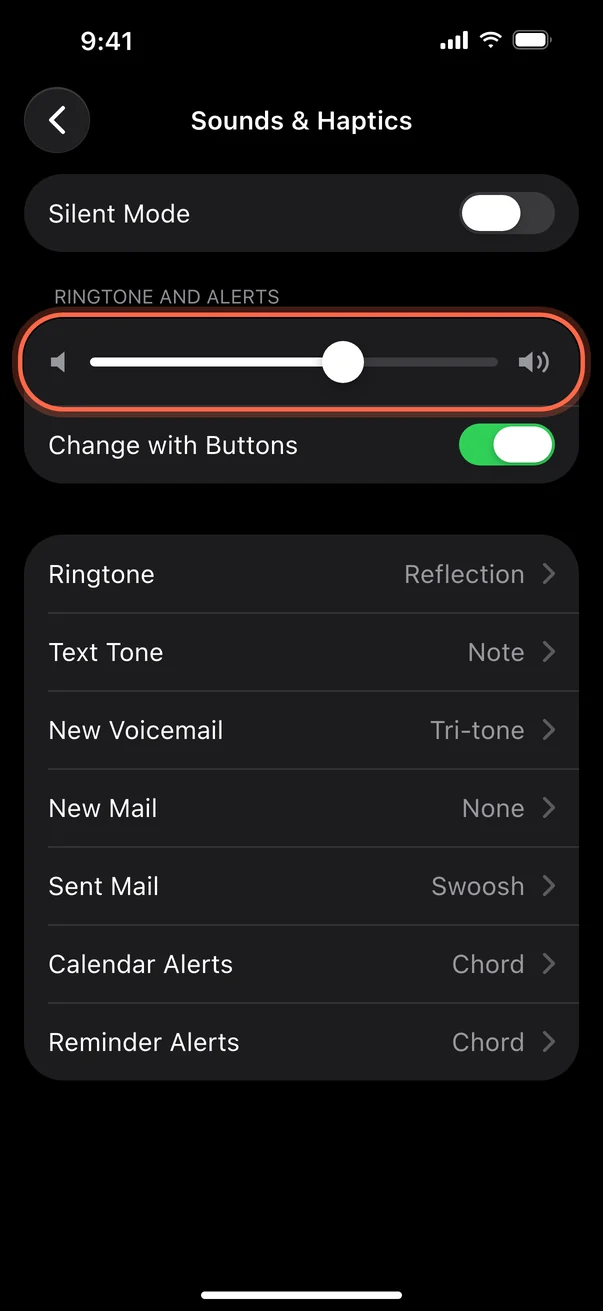
Apple describes both versions in Change sounds and vibrations on iPhone, and our guide to changing the alarm sound walks through the iOS 27 setting.
Check the settings that quietly turn the volume down
Two settings can make a correct alarm quiet without any warning.
Change with Buttons. In Settings, Sounds & Haptics, this switch lets the volume buttons change the alarm volume too (How to set and change alarms on your iPhone). On iOS 27 it sits under Ringtone and only moves the alarm volume while Match Ringtone Volume is on. It sounds handy, but it also means a stray press of the volume-down button in your bed or pocket lowers tomorrow's alarm. If you don't need it, turn it off and set the slider once.
Attention Aware Features. On iPhones with Face ID, the front camera checks whether you're looking at the phone, and Apple says it can then lower the volume of some alerts (Apple Support). Apple doesn't name alarms, and it only acts while you're looking at the screen, so it explains a quiet alarm rather than a silent one. To rule it out, open Settings, tap Face ID & Passcode, and turn off Attention Aware Features for a few nights. The same switch is also under Settings, Accessibility, Face ID & Attention. Leave Require Attention for Face ID alone, since that one is a security setting and has nothing to do with alarms.
If it's the sleep schedule alarm
If your alarm sits under Sleep | Wake Up at the top of the Alarms screen, it belongs to your sleep schedule, and it has its own switch, sound and volume.
- In Clock, tap Alarms.
- Tap Change next to the wake-up alarm.
- Scroll to Alarm Options. Check Alarm is on, then check Sounds & Haptics and the volume slider.
- Tap Done, then choose Change Next Alarm Only or Change This Schedule.
The sleep schedule alarm only rings on the days the schedule covers. If you picked Change Next Alarm Only last time, the alarm went back to the schedule's own settings the day after. That's an easy one to get caught by. To change which days it rings, tap Edit Sleep Schedule in Health. Apple explains it in Change your wake up alarm in Clock on iPhone.
If you'd rather have one alarm and one set of settings to check, turn the sleep schedule off and set a regular alarm in Clock instead.
If you wear an Apple Watch to bed
When you wear the watch to bed, the sleep schedule alarm plays on the watch, and the iPhone stays quiet. To hear it on the phone too, open the wake-up alarm as above and turn on Always Play on iPhone under Alarm Options (iOS 26.4 or later, sleep schedule alarms only, 9to5Mac). An alarm you set on the watch itself only rings on the watch (Apple Support).
Check what the iPhone is connected to
Apple says that when headphones are connected, the alarm plays through the iPhone's speaker and through wired and wireless headphones, so earbuds shouldn't swallow it (How to set and change alarms on your iPhone). If you sleep with earbuds in, it plays in them at the alarm volume, so check that volume too. To rule Bluetooth out completely, open Settings, tap Bluetooth and turn it off for one night. The Control Center button isn't enough for this test: it only disconnects accessories, and Apple says Bluetooth comes back on its own at 5 AM (Apple Support).
StandBy and the Date & Time setting
When your iPhone is in StandBy, on its side on a charger, alarms don't vibrate. The sound still plays, so make sure it isn't set to None, because there's no buzz to fall back on. And Apple says changing the time on your iPhone by hand can affect alarms. Open Settings, tap General, then Date & Time, and check Set Time Automatically is on (Set Automatically on iOS 26). If you travel, this is also what keeps the clock right.
Do Not Disturb and Focus
People definately get this one wrong. Apple says a Clock alarm sounds even with Do Not Disturb or another Focus on, Sleep included (Set an alarm in Clock), and the Ring/Silent switch or Action button doesn't change that either. A Focus silences calls and notifications, and a Clock alarm is neither. If you still want to be sure, turn on your usual Focus, set an alarm for two minutes from now and listen for it.
Restart, then update iOS
If the alarm and the settings look right, restart the phone, and make sure it had power overnight: a phone that died or was switched off can't ring.
- Open Settings, tap General, then tap Shut Down.
- Slide to power off, wait a few seconds, then hold the side button to turn it back on.
- Open Settings, tap General, then Software Update, and install anything waiting.
Then test it: set an alarm two minutes ahead, lock the phone and wait. Doing it with your normal setup (charging, Bluetooth, StandBy) tells you more than a test with the screen on. Still not ringing? Delete the alarm, create a new one from scratch and give it a different sound. That rules out one broken alarm. As a last resort, open Settings, tap General, Transfer or Reset iPhone, Reset, then Reset All Settings. It keeps your data but resets network, location and privacy settings and removes Apple Pay cards (Apple Support), so use it last.
If your alarm rings but you still don't wake up, that's a different problem. If you often sleep through alarms or have trouble waking, it may be worth talking to a doctor.
If you'd rather use a different alarm app
Since iOS 26, apps built on Apple's AlarmKit can ring as real alarms on iPhone, through Silent mode and Focus, just like the Clock app.
DayTone (iPhone, iOS 26.1 or later) is one of them. Each alarm can wake you with a short, original AI-made song written around the goals you set: the free plan includes 3 new songs a month and Plus writes a new one every morning. A backup sound is stored on the phone before every alarm, so it rings even when the song isn't ready or the phone is offline. It can't make the iPhone louder than its own volume setting, so check the volume above whichever alarm you use.
Why is my iPhone alarm not going off? Quick answers
Does Silent mode stop my iPhone alarm?
No. Alarms set in Clock ring even when Silent mode is on.
Does Do Not Disturb or a Focus stop my alarm?
No. Apple says a Clock alarm sounds with Do Not Disturb or any other Focus on.
Why is my alarm quieter than it should be?
Check the alarm volume first (Alarms and Timers on iOS 27, Ringtone and Alerts on iOS 26), then Change with Buttons and Attention Aware Features.
Why does my alarm only vibrate?
Its sound is probably set to None, or the volume is too low. See the sound and volume checks above.
Why did my alarm not ring this morning even though it was on?
Check teh AM and PM setting, the repeat days, and whether it's the sleep schedule alarm with its own settings. If you wore an Apple Watch to bed, it may have rung on the watch.